

Update model card for PresentAgent
#11
by
nielsr
HF Staff
- opened
README.md
CHANGED
|
@@ -4,37 +4,55 @@ language:
|
|
| 4 |
- zh
|
| 5 |
license: apache-2.0
|
| 6 |
pipeline_tag: text-to-speech
|
|
|
|
|
|
|
|
|
|
| 7 |
---
|
| 8 |
|
| 9 |
-
#
|
| 10 |
-
This is a huggingface model card for MegaTTS 3 👋
|
| 11 |
|
| 12 |
-
|
| 13 |
-
- Project Page (Audio Samples): <https://sditdemo.github.io/sditdemo/>
|
| 14 |
-
- github: <https://github.com/bytedance/MegaTTS3>
|
| 15 |
-
- [Demo Video](https://github.com/user-attachments/assets/0174c111-f392-4376-a34b-0b5b8164aacc)
|
| 16 |
-
- Huggingface Space: https://huggingface.co/spaces/ByteDance/MegaTTS3
|
| 17 |
|
| 18 |
-
|
| 19 |
|
| 20 |
-
|
| 21 |
-
|
| 22 |
-
|
| 23 |
-
|
|
|
|
|
|
|
|
|
|
|
|
|
|
|
|
|
|
|
|
|
|
|
|
|
|
|
|
|
|
|
|
|
|
|
|
|
|
|
|
|
|
|
|
|
|
|
|
|
|
|
|
|
|
|
|
|
|
|
|
|
|
|
|
|
|
|
|
|
|
|
|
|
|
|
|
| 24 |
```
|
| 25 |
|
| 26 |
**Model Download**
|
| 27 |
|
| 28 |
-
|
| 29 |
-
huggingface-cli download ByteDance/MegaTTS3 --local-dir ./checkpoints --local-dir-use-symlinks False
|
| 30 |
-
```
|
| 31 |
|
| 32 |
**Requirements (for Linux)**
|
| 33 |
|
| 34 |
-
```sh
|
| 35 |
-
# Create a python 3.10 conda env (you could also use virtualenv)
|
| 36 |
-
conda create -n megatts3-env python=3.10
|
| 37 |
-
conda activate megatts3-env
|
| 38 |
pip install -r requirements.txt
|
| 39 |
|
| 40 |
# Set the root directory
|
|
@@ -48,21 +66,13 @@ export CUDA_VISIBLE_DEVICES=0
|
|
| 48 |
```
|
| 49 |
|
| 50 |
**Requirements (for Windows)**
|
| 51 |
-
|
| 52 |
-
```sh
|
| 53 |
-
# [The Windows version is currently under testing]
|
| 54 |
-
# Comment below dependence in requirements.txt:
|
| 55 |
-
# # WeTextProcessing==1.0.4.1
|
| 56 |
-
|
| 57 |
-
# Create a python 3.10 conda env (you could also use virtualenv)
|
| 58 |
-
conda create -n megatts3-env python=3.10
|
| 59 |
-
conda activate megatts3-env
|
| 60 |
pip install -r requirements.txt
|
| 61 |
conda install -y -c conda-forge pynini==2.1.5
|
| 62 |
pip install WeTextProcessing==1.0.3
|
| 63 |
|
| 64 |
# [Optional] If you want GPU inference, you may need to install specific version of PyTorch for your GPU from https://pytorch.org/.
|
| 65 |
-
|
| 66 |
|
| 67 |
# [Note] if you encounter bugs related with `ffprobe` or `ffmpeg`, you can install it through `conda install -c conda-forge ffmpeg`
|
| 68 |
|
|
@@ -74,61 +84,132 @@ conda env config vars set PYTHONPATH="C:\path\to\MegaTTS3;%PYTHONPATH%" # For co
|
|
| 74 |
# [Optional] Set GPU
|
| 75 |
set CUDA_VISIBLE_DEVICES=0 # Windows
|
| 76 |
$env:CUDA_VISIBLE_DEVICES=0 # Powershell on Windows
|
|
|
|
| 77 |
```
|
| 78 |
|
| 79 |
-
|
| 80 |
|
| 81 |
-
|
| 82 |
-
# [The Docker version is currently under testing]
|
| 83 |
-
# ! You should download the pretrained checkpoint before running the following command
|
| 84 |
-
docker build . -t megatts3:latest
|
| 85 |
|
| 86 |
-
|
| 87 |
-
|
| 88 |
-
|
| 89 |
-
|
|
|
|
|
|
|
|
|
|
|
|
|
|
|
|
|
|
|
| 90 |
|
| 91 |
-
|
| 92 |
-
|
|
|
|
|
|
|
|
|
|
|
|
|
|
|
|
| 93 |
|
| 94 |
-
|
| 95 |
-
|
| 96 |
-
|
| 97 |
-
>
|
| 98 |
-
> This project is primarily intended for academic purposes. For academic datasets requiring evaluation, you may upload them to the voice request queue in [link2](https://drive.google.com/drive/folders/1gCWL1y_2xu9nIFhUX_OW5MbcFuB7J5Cl?usp=sharing) (within 24s for each clip). After verifying that your uploaded voices are free from safety issues, we will upload their latent files to [link1](https://drive.google.com/drive/folders/1QhcHWcy20JfqWjgqZX1YM3I6i9u4oNlr?usp=sharing) as soon as possible.
|
| 99 |
-
>
|
| 100 |
-
> In the coming days, we will also prepare and release the latent representations for some common TTS benchmarks.
|
| 101 |
|
| 102 |
-
|
| 103 |
|
| 104 |
-
|
| 105 |
|
| 106 |
-
```bash
|
| 107 |
-
|
| 108 |
-
|
|
|
|
|
|
|
|
|
|
| 109 |
|
| 110 |
-
|
| 111 |
-
|
| 112 |
-
|
| 113 |
-
|
|
|
|
|
|
|
| 114 |
|
| 115 |
-
|
| 116 |
|
| 117 |
-
|
| 118 |
-
# When p_w (intelligibility weight) ≈ 1.0, the generated audio closely retains the speaker’s original accent. As p_w increases, it shifts toward standard pronunciation.
|
| 119 |
-
# t_w (similarity weight) is typically set 0–3 points higher than p_w for optimal results.
|
| 120 |
-
# Useful for accented TTS or solving the accent problems in cross-lingual TTS.
|
| 121 |
-
python tts/infer_cli.py --input_wav 'assets/English_prompt.wav' --input_text '这是一条有口音的音频。' --output_dir ./gen --p_w 1.0 --t_w 3.0
|
| 122 |
|
| 123 |
-
|
| 124 |
-
```
|
| 125 |
|
| 126 |
-
|
| 127 |
|
| 128 |
-
|
| 129 |
-
|
| 130 |
-
|
| 131 |
-
|
|
|
|
|
|
|
|
|
|
|
|
|
|
|
|
|
|
|
|
|
|
|
|
|
|
|
|
|
|
|
|
|
|
|
|
|
|
|
|
|
|
|
|
|
|
|
|
|
|
|
|
|
|
|
|
|
|
|
|
|
|
|
|
|
|
|
|
|
|
|
|
|
|
|
|
|
|
|
|
|
|
|
|
|
|
|
|
|
|
|
|
|
|
|
|
|
|
|
|
|
|
|
|
|
|
|
|
|
|
|
|
|
|
|
|
|
|
|
|
|
|
|
|
|
|
|
|
|
|
|
|
|
|
|
|
|
|
|
|
|
|
|
|
|
|
|
|
|
|
|
|
|
|
|
|
|
|
|
|
|
|
|
|
|
|
|
|
|
|
|
|
|
|
|
|
|
|
|
|
|
|
|
|
|
|
|
|
|
|
|
|
|
|
|
|
|
|
|
| 132 |
|
| 133 |
## Security
|
| 134 |
|
|
@@ -143,9 +224,16 @@ This project is licensed under the [Apache-2.0 License](LICENSE).
|
|
| 143 |
|
| 144 |
## BibTeX Entry and Citation Info
|
| 145 |
|
| 146 |
-
This
|
|
|
|
|
|
|
|
|
|
|
|
|
|
|
|
|
|
|
|
|
|
|
|
|
| 147 |
|
| 148 |
-
```
|
| 149 |
@article{jiang2025sparse,
|
| 150 |
title={Sparse Alignment Enhanced Latent Diffusion Transformer for Zero-Shot Speech Synthesis},
|
| 151 |
author={Jiang, Ziyue and Ren, Yi and Li, Ruiqi and Ji, Shengpeng and Ye, Zhenhui and Zhang, Chen and Jionghao, Bai and Yang, Xiaoda and Zuo, Jialong and Zhang, Yu and others},
|
|
|
|
| 4 |
- zh
|
| 5 |
license: apache-2.0
|
| 6 |
pipeline_tag: text-to-speech
|
| 7 |
+
library_name: transformers
|
| 8 |
+
tags:
|
| 9 |
+
- multimodal-agent
|
| 10 |
---
|
| 11 |
|
| 12 |
+
# PresentAgent: Multimodal Agent for Presentation Video Generation
|
|
|
|
| 13 |
|
| 14 |
+
This repository contains the model and code for **PresentAgent**, a multimodal agent that transforms long-form documents into narrated presentation videos, as described in the paper:
|
|
|
|
|
|
|
|
|
|
|
|
|
| 15 |
|
| 16 |
+
**[PresentAgent: Multimodal Agent for Presentation Video Generation](https://huggingface.co/papers/2507.04036)**
|
| 17 |
|
| 18 |
+
<div align="center">
|
| 19 |
+
|
| 20 |
+
[🏠 Homepage](https://github.com/AIGeeksGroup/PresentAgent) | [💻 Code](https://github.com/AIGeeksGroup/PresentAgent) | [🚀 Colab Demo](https://colab.research.google.com/drive/1_2buwbVY6RLoi9NdjXihCOTWoEdL70Fk?usp=sharing) | [📄 Paper](https://huggingface.co/papers/2507.04036)
|
| 21 |
+
|
| 22 |
+
</div>
|
| 23 |
+
|
| 24 |
+
> [!NOTE]
|
| 25 |
+
> 🙋🏻♀️ To learn more about PresentAgent, please see the following presentation video, which was generated entirely by PresentAgent **without** any manual curation.
|
| 26 |
+
|
| 27 |
+
https://github.com/user-attachments/assets/240d3ae9-61a1-4e5f-98d7-9c20a99f4c2b
|
| 28 |
+
|
| 29 |
+
## Introduction
|
| 30 |
+
|
| 31 |
+
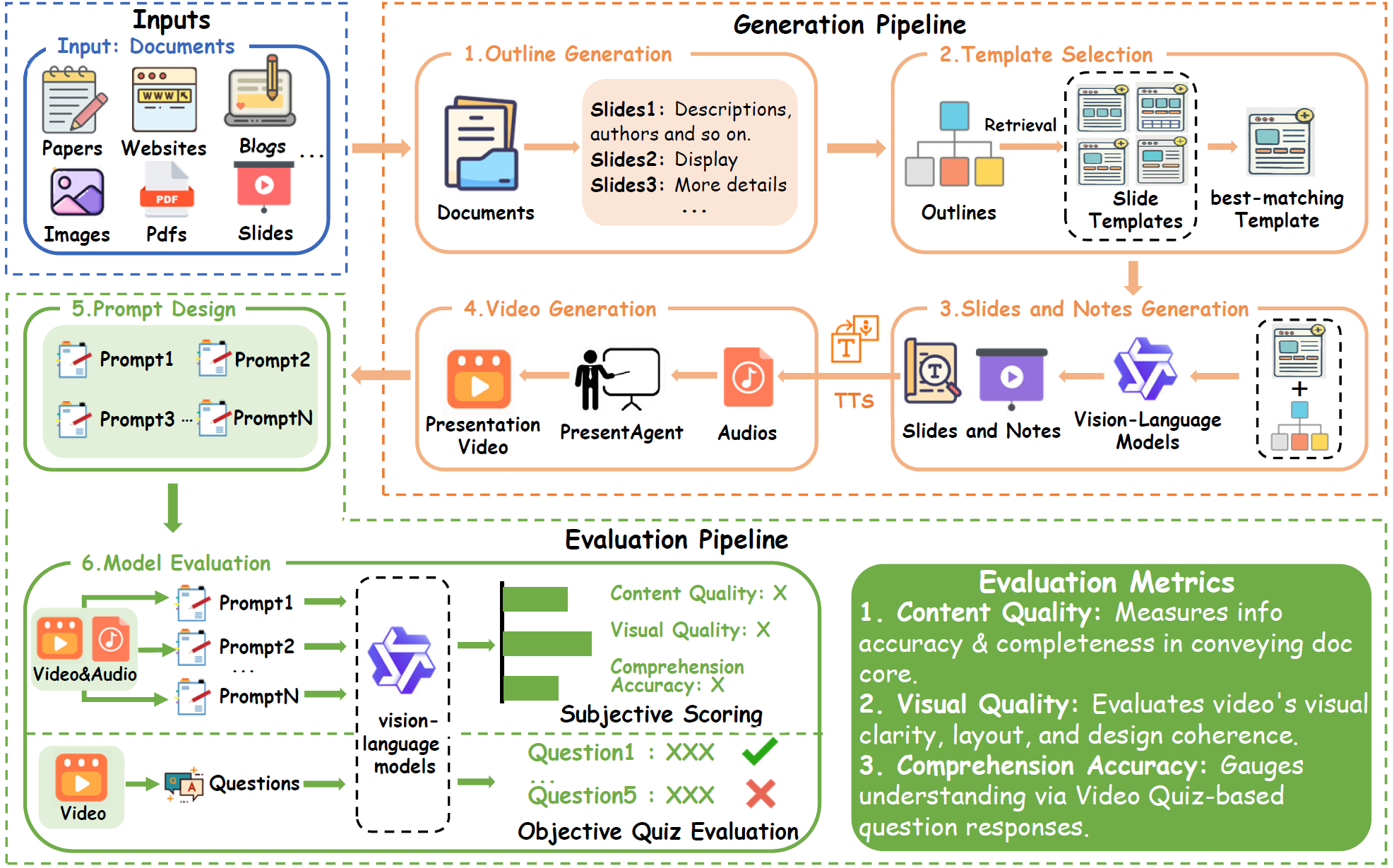
We present PresentAgent, a multimodal agent that transforms long-form documents into narrated presentation videos. While existing approaches are limited to generating static slides or text summaries, our method advances beyond these limitations by producing fully synchronized visual and spoken content that closely mimics human-style presentations. To achieve this integration, PresentAgent employs a modular pipeline that systematically segments the input document, plans and renders slide-style visual frames, generates contextual spoken narration with large language models and Text-to-Speech models, and seamlessly composes the final video with precise audio-visual alignment. Given the complexity of evaluating such multimodal outputs, we introduce PresentEval, a unified assessment framework powered by Vision-Language Models that comprehensively scores videos across three critical dimensions: content fidelity, visual clarity, and audience comprehension through prompt-based evaluation. Our experimental validation on a curated dataset of 30 document–presentation pairs demonstrates that PresentAgent approaches human-level quality across all evaluation metrics. These results highlight the significant potential of controllable multimodal agents in transforming static textual materials into dynamic, effective, and accessible presentation formats.
|
| 32 |
+
|
| 33 |
+
|
| 34 |
+
|
| 35 |
+
## 🔧Run Your PresentAgent
|
| 36 |
+
|
| 37 |
+
> [!TIP]
|
| 38 |
+
> 🎮 Before deploying PresentAgent on your local machine, please check out our [**Colab demo**](https://colab.research.google.com/drive/1_2buwbVY6RLoi9NdjXihCOTWoEdL70Fk?usp=sharing), which is available online and ready to use.
|
| 39 |
+
|
| 40 |
+
### 1. Install & Requirements
|
| 41 |
+
|
| 42 |
+
```bash
|
| 43 |
+
conda create -n presentagent python=3.11
|
| 44 |
+
conda activate presentagent
|
| 45 |
+
pip install -r requirements.txt
|
| 46 |
+
cd presentagent/MegaTTS3
|
| 47 |
```
|
| 48 |
|
| 49 |
**Model Download**
|
| 50 |
|
| 51 |
+
The pretrained checkpoint can be found at [Google Drive](https://drive.google.com/drive/folders/1CidiSqtHgJTBDAHQ746_on_YR0boHDYB?usp=sharing) or [Huggingface](https://huggingface.co/ByteDance/MegaTTS3). Please download them and put them to ``presentagent/MegaTTS3/checkpoints/xxx``.
|
|
|
|
|
|
|
| 52 |
|
| 53 |
**Requirements (for Linux)**
|
| 54 |
|
| 55 |
+
``` sh
|
|
|
|
|
|
|
|
|
|
| 56 |
pip install -r requirements.txt
|
| 57 |
|
| 58 |
# Set the root directory
|
|
|
|
| 66 |
```
|
| 67 |
|
| 68 |
**Requirements (for Windows)**
|
| 69 |
+
``` sh
|
|
|
|
|
|
|
|
|
|
|
|
|
|
|
|
|
|
|
|
|
|
|
|
|
| 70 |
pip install -r requirements.txt
|
| 71 |
conda install -y -c conda-forge pynini==2.1.5
|
| 72 |
pip install WeTextProcessing==1.0.3
|
| 73 |
|
| 74 |
# [Optional] If you want GPU inference, you may need to install specific version of PyTorch for your GPU from https://pytorch.org/.
|
| 75 |
+
pip install torch torchvision torchaudio --index-url https://download.pytorch.org/whl/cu126
|
| 76 |
|
| 77 |
# [Note] if you encounter bugs related with `ffprobe` or `ffmpeg`, you can install it through `conda install -c conda-forge ffmpeg`
|
| 78 |
|
|
|
|
| 84 |
# [Optional] Set GPU
|
| 85 |
set CUDA_VISIBLE_DEVICES=0 # Windows
|
| 86 |
$env:CUDA_VISIBLE_DEVICES=0 # Powershell on Windows
|
| 87 |
+
|
| 88 |
```
|
| 89 |
|
| 90 |
+
### 2. Generate Via WebUI
|
| 91 |
|
| 92 |
+
1. **Serve Backend**
|
|
|
|
|
|
|
|
|
|
| 93 |
|
| 94 |
+
Initialize your models in `presentagent/backend.py`:
|
| 95 |
+
```python
|
| 96 |
+
language_model = AsyncLLM(
|
| 97 |
+
model="Qwen2.5-72B-Instruct",
|
| 98 |
+
api_base="http://localhost:7812/v1"
|
| 99 |
+
)
|
| 100 |
+
vision_model = AsyncLLM(model="gpt-4o-2024-08-06")
|
| 101 |
+
text_embedder = AsyncLLM(model="text-embedding-3-small")
|
| 102 |
+
```
|
| 103 |
+
Or use the environment variables:
|
| 104 |
|
| 105 |
+
```bash
|
| 106 |
+
export OPENAI_API_KEY="your_key"
|
| 107 |
+
export API_BASE="http://your_service_provider/v1"
|
| 108 |
+
export LANGUAGE_MODEL="Qwen2.5-72B-Instruct-GPTQ-Int4"
|
| 109 |
+
export VISION_MODEL="gpt-4o-2024-08-06"
|
| 110 |
+
export TEXT_MODEL="text-embedding-3-small"
|
| 111 |
+
```
|
| 112 |
|
| 113 |
+
```bash
|
| 114 |
+
python backend.py
|
| 115 |
+
```
|
|
|
|
|
|
|
|
|
|
|
|
|
| 116 |
|
| 117 |
+
2. **Launch Frontend**
|
| 118 |
|
| 119 |
+
> Note: The backend API endpoint is configured at `presentagent/vue.config.js`
|
| 120 |
|
| 121 |
+
```bash
|
| 122 |
+
cd presentagent
|
| 123 |
+
npm install
|
| 124 |
+
npm run serve
|
| 125 |
+
```
|
| 126 |
+
### Usage
|
| 127 |
|
| 128 |
+
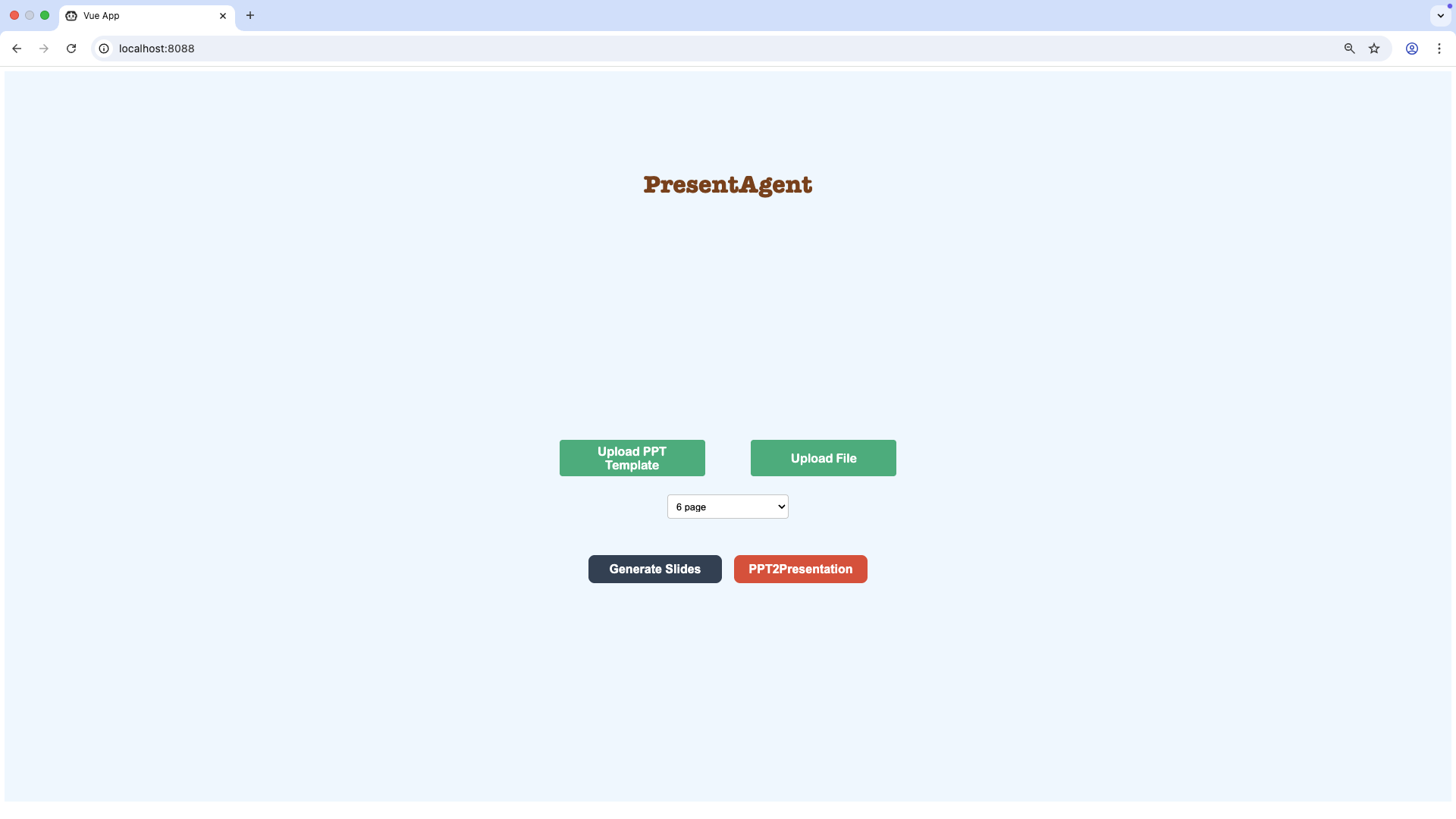
First, you need to upload a PPT template and the document, then click **Generate Slides** to generate and download the PPT. After downloading the PPT, you can modify it in your own way and then click **PPT2Presentation**.
|
| 129 |
+
|
| 130 |
+
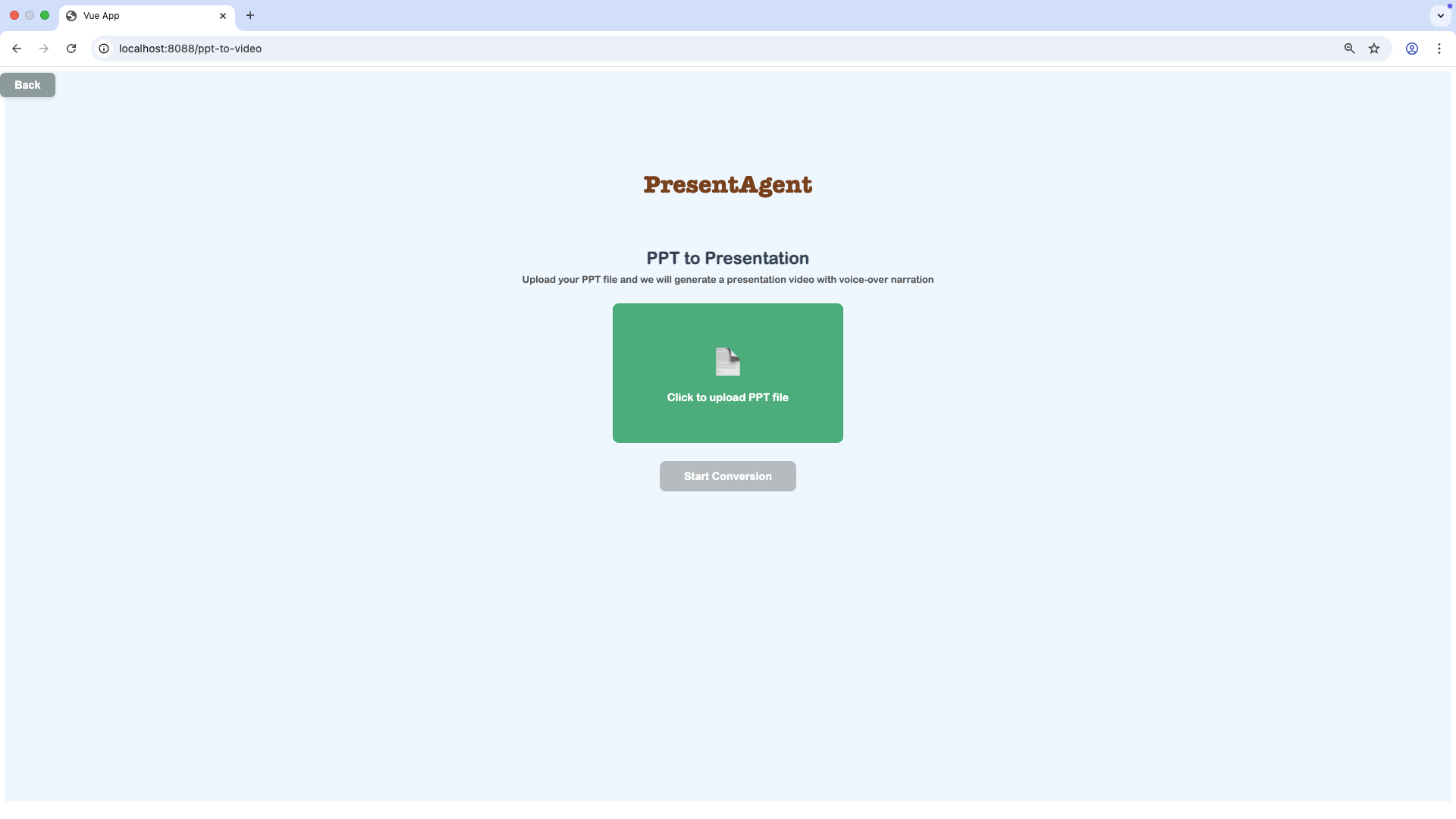
After uploading the PPT, you can click **Start Conversion** to make a presentation video.
|
| 131 |
+
|
| 132 |
+
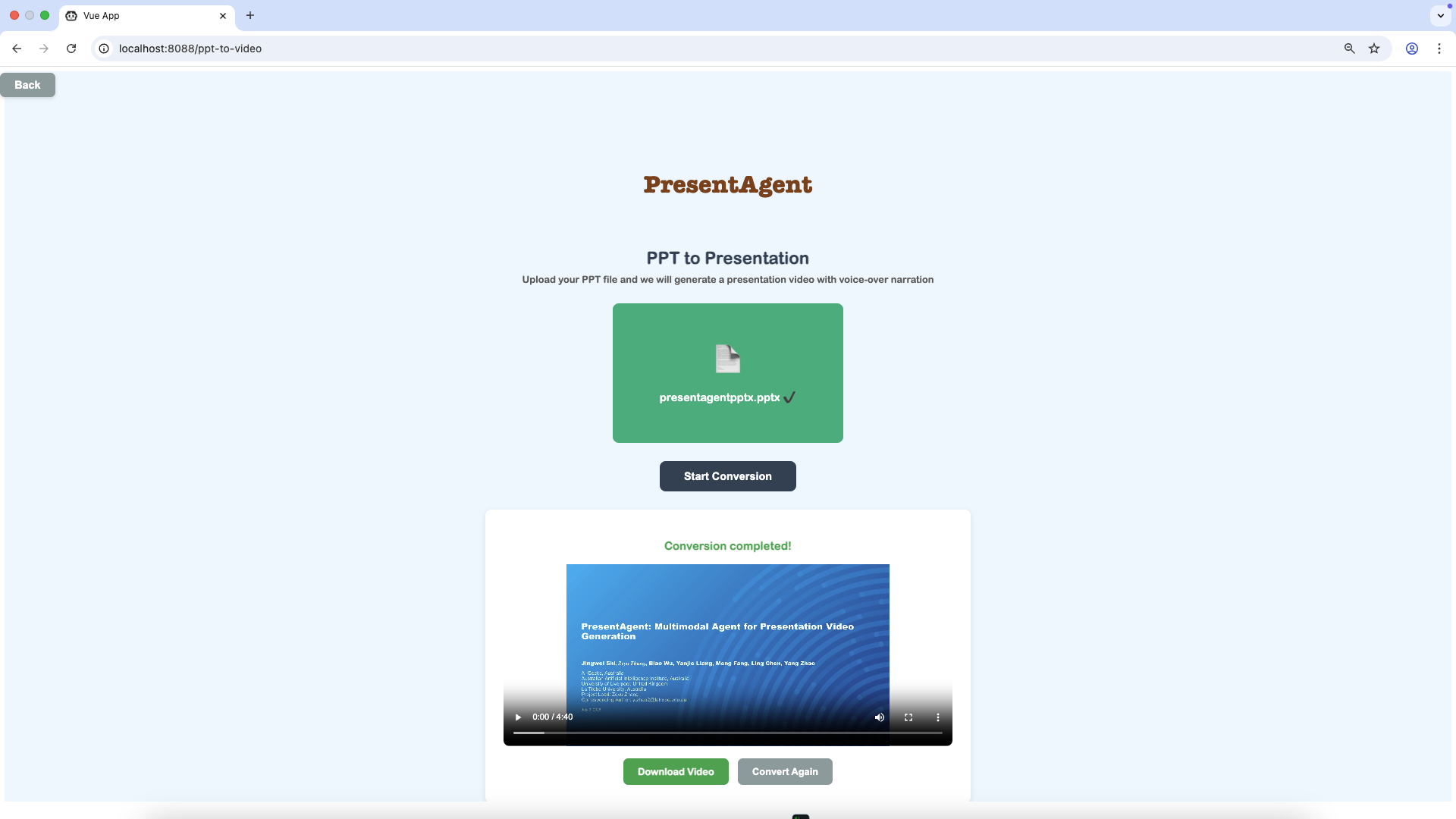
Finally, you will get a presentation video and watch it in the page or download it.
|
| 133 |
+
|
| 134 |
|
| 135 |
+
## 📁 Presentation Benchmark
|
| 136 |
|
| 137 |
+
### Doc2Present Benchmark
|
|
|
|
|
|
|
|
|
|
|
|
|
| 138 |
|
| 139 |
+
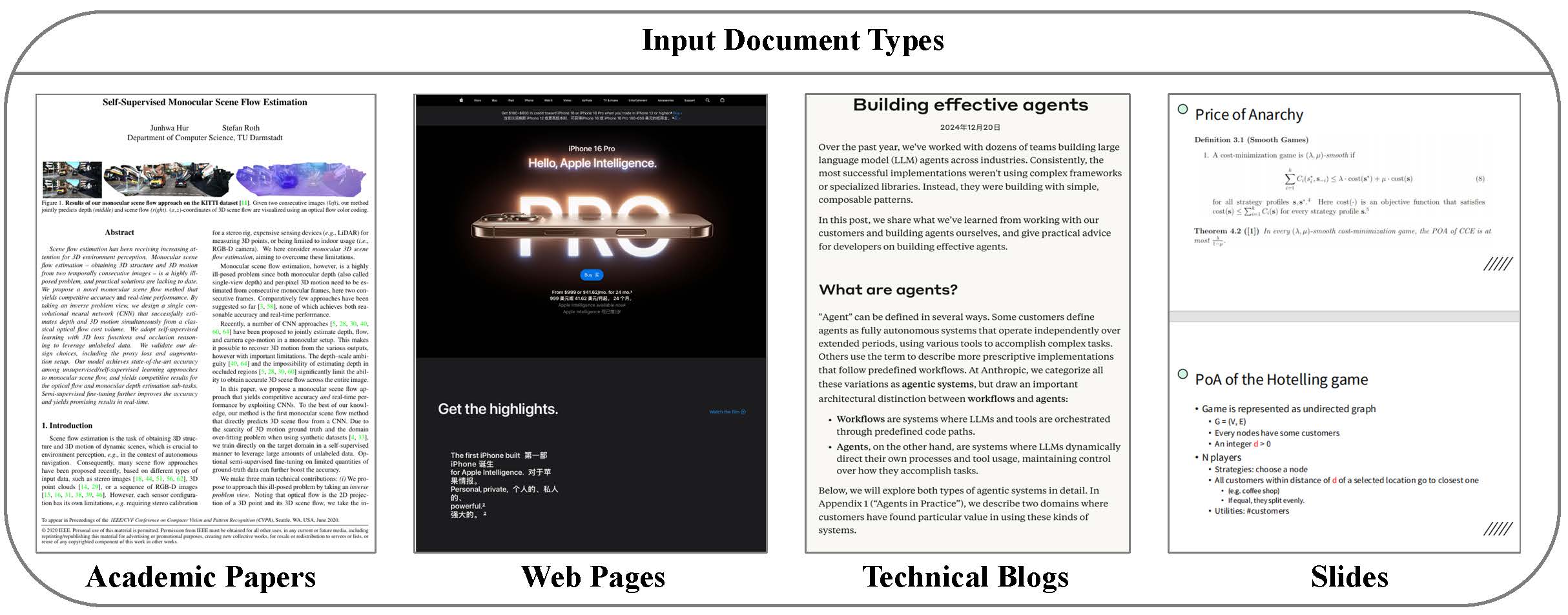
To support the evaluation of document to presentation video generation, we curate the **Doc2Present Benchmark**, a diverse dataset of document–presentation video pairs spanning multiple domains. As shown in the following figure, our benchmark encompasses four representative document types (academic papers, web pages, technical blogs, and slides) paired with human-authored videos, covering diverse real-world domains like education, research, and business reports.
|
|
|
|
| 140 |
|
| 141 |
+
|
| 142 |
|
| 143 |
+
We collect **30 high-quality video samples** from **public platforms**, **educational repositories**, and **professional presentation archives**. Each video follows a structured narration format, combining slide-based visuals with synchronized voiceover. We manually align each video with its source document and ensure the following conditions are met:
|
| 144 |
+
|
| 145 |
+
- The content structure of the video follows that of the document.
|
| 146 |
+
|
| 147 |
+
- The visuals convey document information in a compact, structured form.
|
| 148 |
+
- The narration and slides are well-aligned temporally.
|
| 149 |
+
|
| 150 |
+
The average document length is **3,000–8,000 words**, while the corresponding videos range from **1 to 2 minutes** and contain **5-10 slides**. This setting highlights the core challenge of the task: transforming dense, domain-specific documents into effective and digestible multimodal presentations.
|
| 151 |
+
|
| 152 |
+
### PresentEval
|
| 153 |
+
|
| 154 |
+
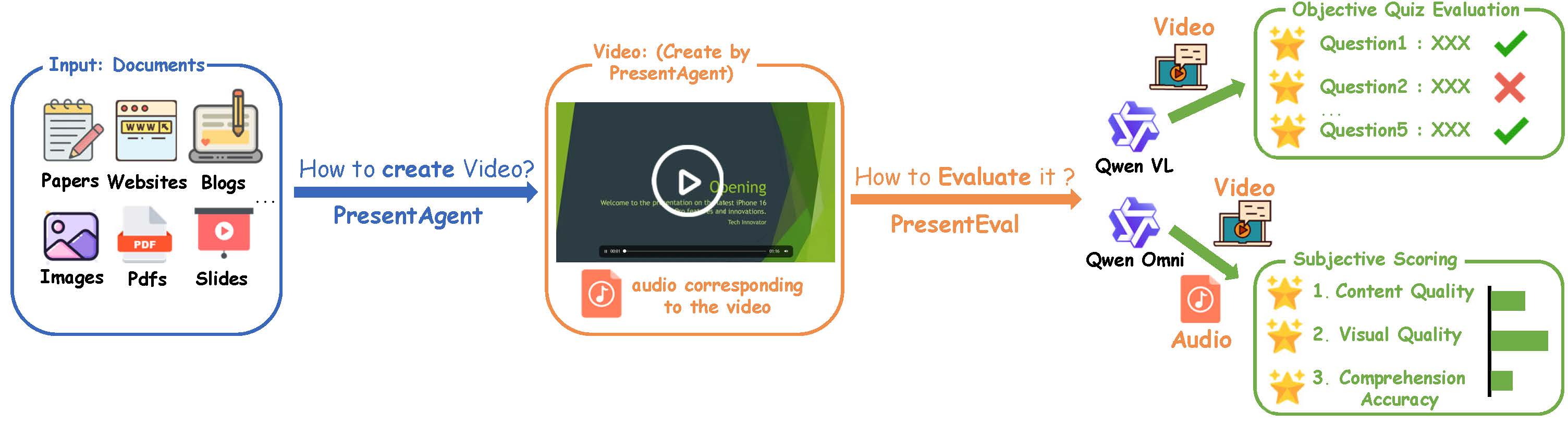
To assess the quality of generated presentation videos, we adopt two complementary evaluation strategies: Objective Quiz Evaluation and Subjective Scoring.
|
| 155 |
+
|
| 156 |
+
|
| 157 |
+
|
| 158 |
+
For each video, we provide the vision-language model with the complete set of slide images and the full narration transcript as a unified input—simulating how a real viewer would experience the presentation.
|
| 159 |
+
|
| 160 |
+
- In Objective Quiz Evaluation, the model answers a fixed set of factual questions to determine whether the video accurately conveys the key information from the source content.
|
| 161 |
+
- In Subjective Scoring, the model evaluates the video along three dimensions: the coherence of the narration, the clarity and design of the visuals, and the overall ease of understanding.
|
| 162 |
+
- All evaluations are conducted without ground-truth references and rely entirely on the model’s interpretation of the presented content.
|
| 163 |
+
|
| 164 |
+
For Objective Quiz Evaluation, to evaluate whether a generated presentation video effectively conveys the core content of its source document, we use a fixed-question comprehension evaluation protocol. Specifically, we manually design five multiple-choice questions for each document, tailored to its content as follows:
|
| 165 |
+
|
| 166 |
+
| Prensentation of Web Pages | What is the main feature highlighted in the iPhone’s promotional webpage? |
|
| 167 |
+
| :---------------------------------: | ------------------------------------------------------------ |
|
| 168 |
+
| A. | A more powerful chip for faster performance |
|
| 169 |
+
| B. | A brighter and more vibrant display |
|
| 170 |
+
| C. | An upgraded camera system with better lenses |
|
| 171 |
+
| D. | A longer-lasting and more efficient battery |
|
| 172 |
+
| **Prensentation of Academic Paper** | What primary research gap did the authors aim to address by introducing the FineGym dataset? |
|
| 173 |
+
| A. | Lack of low-resolution sports footage for compression studies |
|
| 174 |
+
| B. | Need for fine-grained action understanding that goes beyond coarse categories |
|
| 175 |
+
| C. | Absence of synthetic data to replace human annotations |
|
| 176 |
+
| D. | Shortage of benchmarks for background context recognition |
|
| 177 |
+
|
| 178 |
+
For Subjective Scoring, to evaluate the quality of generated presentation videos, we adopt a prompt-based assessment using vision-language models. The prompts are as follows:
|
| 179 |
+
|
| 180 |
+
| Video | Scoring Prompt |
|
| 181 |
+
| :-----------: | ------------------------------------------------------------ |
|
| 182 |
+
| Narr. Coh. | “How coherent is the narration across the video? Are the ideas logically connected and easy to follow?” |
|
| 183 |
+
| Visual Appeal | “How would you rate the visual design of the slides in terms of layout, aesthetics, and overall quality?” |
|
| 184 |
+
| Comp. Diff. | “How easy is it to understand the presentation as a viewer? Were there any confusing or contradictory parts?” |
|
| 185 |
+
| **Audio** | **Scoring Prompt** |
|
| 186 |
+
| Narr. Coh. | “How coherent is the narration throughout the audio? Are the ideas logically structured and easy to follow?” |
|
| 187 |
+
| Audio Appeal | “How pleasant and engaging is the narrator’s voice in terms of tone, pacing, and delivery?” |
|
| 188 |
+
|
| 189 |
+
## 🧪 Experiment
|
| 190 |
+
|
| 191 |
+
### ✳️ Comparative Study
|
| 192 |
+
|
| 193 |
+
| Method | Model | Quiz Accuracy | Video Score(mean) | Audio Score(mean) |
|
| 194 |
+
| :----------: | :---------------: | :-----------: | :---------------: | :---------------: |
|
| 195 |
+
| Human | Human | 0.56 | 4.47 | 4.80 |
|
| 196 |
+
| PresentAgent | Claude-3.7-sonnet | 0.64 | 4.00 | 4.53 |
|
| 197 |
+
| PresentAgent | Qwen-VL-Max | 0.52 | 4.47 | 4.60 |
|
| 198 |
+
| PresentAgent | Gemini-2.5-pro | 0.52 | 4.33 | 4.33 |
|
| 199 |
+
| PresentAgent | Gemini-2.5-flash | 0.52 | 4.33 | 4.40 |
|
| 200 |
+
| PresentAgent | GPT-4o-Mini | 0.64 | 4.67 | 4.40 |
|
| 201 |
+
| PresentAgent | GPT-4o | 0.56 | 3.93 | 4.47 |
|
| 202 |
+
|
| 203 |
+
---
|
| 204 |
+
|
| 205 |
+
## ⭐ Contribute
|
| 206 |
+
|
| 207 |
+
We warmly welcome you to contribute to our project by submitting pull requests—your involvement is key to keeping our work at the cutting edge! Specifically, we encourage efforts to expand its compatibility with the **latest visual-language (VL) models** and **text-to-speech (TTS) models**, ensuring the project stays aligned with the most recent advancements in these rapidly evolving fields.
|
| 208 |
+
|
| 209 |
+
Beyond model updates, we also invite you to explore adding new features that could enhance the project’s functionality, usability, or versatility. Whether it’s optimizing existing workflows, introducing novel tools, or addressing unmet needs in the community, your creative contributions will help make this project more robust and valuable for everyone.
|
| 210 |
+
|
| 211 |
+
## Acknowledgement
|
| 212 |
+
We thank the authors of [PPTAgent](https://github.com/icip-cas/PPTAgent), [PPT Presenter](https://github.com/chaonan99/ppt_presenter), and [MegaTTS3](https://github.com/bytedance/MegaTTS3) for their open-source code.
|
| 213 |
|
| 214 |
## Security
|
| 215 |
|
|
|
|
| 224 |
|
| 225 |
## BibTeX Entry and Citation Info
|
| 226 |
|
| 227 |
+
This repository serves as a hub for the **PresentAgent** system, which leverages components such as **MegaTTS3** and **Wavtokenizer**. Please cite the following papers if you use content from this repository or the PresentAgent project:
|
| 228 |
+
|
| 229 |
+
```bibtex
|
| 230 |
+
@article{shi2025presentagent,
|
| 231 |
+
title={PresentAgent: Multimodal Agent for Presentation Video Generation},
|
| 232 |
+
author={Shi, Jingwei and Zhang, Zeyu and Wu, Biao and Liang, Yanjie and Fang, Meng and Chen, Ling and Zhao, Yang},
|
| 233 |
+
journal={arXiv preprint arXiv:2507.04036},
|
| 234 |
+
year={2025}
|
| 235 |
+
}
|
| 236 |
|
|
|
|
| 237 |
@article{jiang2025sparse,
|
| 238 |
title={Sparse Alignment Enhanced Latent Diffusion Transformer for Zero-Shot Speech Synthesis},
|
| 239 |
author={Jiang, Ziyue and Ren, Yi and Li, Ruiqi and Ji, Shengpeng and Ye, Zhenhui and Zhang, Chen and Jionghao, Bai and Yang, Xiaoda and Zuo, Jialong and Zhang, Yu and others},
|